Your ERP and your e-shop, always in agreement.

ERP Connector is a hosted service. It moves products, stock, prices, images and customers from the ERP to the shop, and writes every order to the ERP as a sales document, exactly once.

14 days free. Billing starts when plans launch.

Everything with everythingAll integrations
Which ERP connects to which e-shop today
ERPWooCommerceShopify
SoftOneComing soon
EnterSoftPlanned
OdooPlanned
PylonPlanned
PRISMA WinPlanned
Business CentralPlanned
SAP B1Planned

We start with SoftOne and WooCommerce. Every other integration shows its real status, not a promise.

The app's Sync page (shown in Greek): five modules with their schedules, and a failed run that explains what happened and what to do.
When something fails, the app says what happened and what to do, with the button next to it. The app is available in Greek and English.

How it works

  1. Connect the ERP and the shop

    Enter the address and a user of the ERP's Web Services, and the WooCommerce API keys. We check straight away that both sides answer.

  2. Choose what syncs

    Stock and prices only, or the whole catalogue. You see a sample from the ERP and run one test before anything turns on automatically.

  3. Let it run

    Each module runs on its own schedule. If something needs you, it shows on the Home page and in the report that arrives by email.

What moves, and in which direction

From the ERP to the shop

  • Products with variations, categories and attributes
  • Stock
  • Regular and sale prices
  • Product images
  • Customers with addresses and invoicing data

From the shop to the ERP

  • Orders as sales documents
  • New customers, when they are not in the ERP
  • Greek invoice fields: VAT number (ΑΦΜ), tax office (ΔΟΥ), activity, company name

And back to the shop

  • Order status from the ERP
  • Courier tracking number

All features

Every order reaches the ERP once. Never twice.

Each order carries its number in a reference field of the ERP document. Before every send, the service checks whether a document with that reference already exists. If a send gets no answer and cannot be checked, it stops and waits for you instead of sending again.

  • Reference check before every send
  • Failures state the cause, for example an item missing from the ERP
  • Status and tracking number return to the order

How orders are sent

The app's order list (shown in Greek): each order with its ERP document number, the status from the ERP and the tracking number.

For the first-time setup, and for full control

The setup guide at the step "What syncs" (shown in Greek), with three presets and a sample of rows from the ERP.

A setup guide, step by step

Seven steps, from an empty account to an integration that works. Ready presets, one real test run, and the guide resumes where you left off.

  • Presets: "Stock and prices" or "Full catalogue from the ERP"
  • A sample of ERP rows before you save
  • Nothing starts automatically before the test
The app's field mapping editor (shown in Greek), listing the shop fields and the ERP field that fills each one.

Full control of the mapping

Every ERP installation is customised. You decide which ERP field fills each shop field, how numbers, dates and Greek text are read, and which ERP service the rows come from.

  • Mapping editor with a sample and a preview
  • Data formats: encoding, decimals, VAT, codes
  • Versions: see who changed what, and when

Beta

WooCommerce first

WooCommerce is the first shop platform we support and the one the first customers start with. It connects with WooCommerce REST API keys. The sync runs on our infrastructure, not inside your WordPress.

WooCommerce with ERP Connector

  • Connects with a Consumer Key and a Consumer Secret
  • The shop notifies us of new orders immediately
  • Products missing from the ERP become drafts, they are not deleted

History and reports, so you do not have to watch

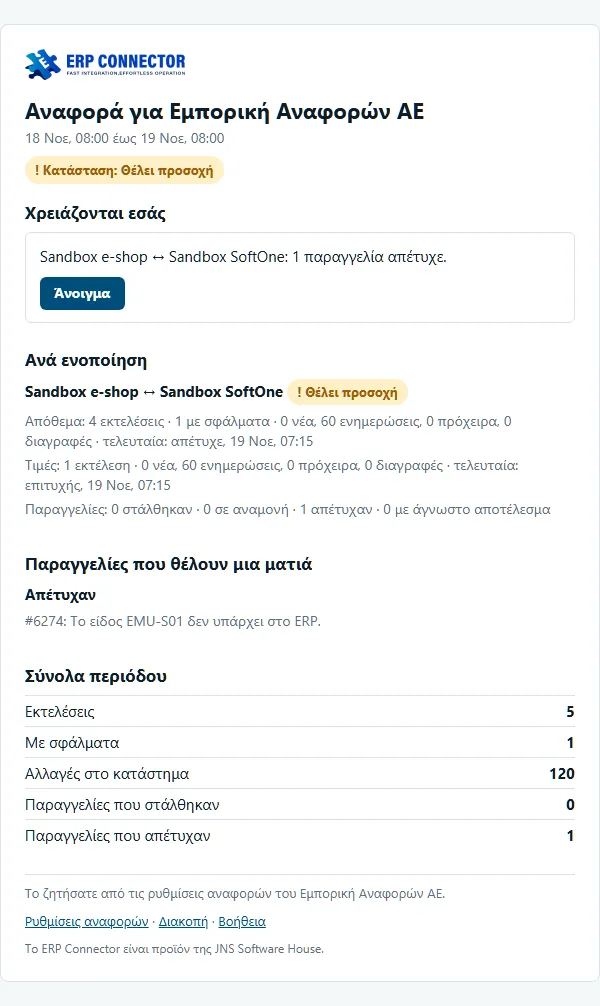
Every run is recorded with what was read, what changed and what failed. The email report arrives daily, weekly, or only when something needs you.

Help centre: Account

The ERP Connector report email (shown in Greek), with what happened and what needs action.

The keys to your ERP deserve care

Two-step verification

Required for everyone who manages connections.

Encrypted credentials

AES-256-GCM, with a separate key per organization. Never shown again.

Per-organization isolation

Each customer's data is separated at database level.

EU hosting

Data stays on infrastructure inside the European Union.

Security in detail

See it with your own data

Open an account, connect the ERP and the shop, and run the first test. If you would rather set it up together, write to us.

14 days free. Billing starts when plans launch.